Monday, March 10, 2025


 Introduction: What Is Data?

In its simplest form, data is information. It includes numbers, text, images, videos, and any form of digital content that holds meaning when analyzed. Every click on a website, online transaction, and sensor reading contributes to the vast ocean of data generated every second. But data alone has no impact—its true power lies in how it is collected, processed, and analyzed to drive informed decisions.


How Data Transforms Businesses

For organizations, data is the new oil. The world’s largest companies, like Google, Amazon, and Facebook, thrive on big data analytics. They gather vast amounts of user data to optimize experiences, personalize recommendations, and increase revenue.

Retail giants leverage predictive analytics to forecast trends and manage inventory efficiently. Financial institutions use real-time data analytics to detect fraud. Even small businesses rely on data-driven marketing strategies to reach the right audience, measure campaign success, and improve customer service. Simply put, data-driven decision-making is the backbone of modern business success.

The Impact on Individuals

Individuals interact with data analytics in more ways than they realize. Netflix and Spotify recommendation engines analyze user behavior to suggest personalized content. Ride-sharing apps like Uber use big data algorithms to adjust pricing dynamically. Health-tracking apps monitor vital signs and provide early warnings for potential health risks.

Even social media platforms leverage user data to curate content, connect people, and influence consumer behavior. However, this also raises concerns about data privacy, cybersecurity, and ethical data usage, as users become more aware of how their personal information is being utilized.

How Governments Leverage Data

Governments worldwide utilize big data and artificial intelligence to improve services, enhance security, and shape policies. Smart cities implement IoT-driven data analytics to manage traffic, reduce pollution, and optimize energy consumption. Law enforcement agencies analyze crime data to deploy resources effectively. Public health organizations track real-time disease outbreaks and respond to emergencies using predictive modeling.

During the COVID-19 pandemic, data played a crucial role in monitoring cases, predicting surges, and guiding response strategies. Governments also depend on economic data analytics for budget management and improving public services.

The Future of Data: What Lies Ahead?

The future of data is vast and ever-evolving. Here are some key data-driven trends that will shape the next decade:

  1. Artificial Intelligence and Machine Learning – AI-driven algorithms will enhance automation, data insights, and decision-making in various industries.

  2. Real-Time Data Analytics – With the rise of IoT devices and 5G technology, businesses will make instant decisions using real-time big data.

  3. Data Privacy and Ethical Data Use – Stricter regulations like GDPR and CCPA will improve consumer data protection and transparency.

  4. Quantum Computing – This emerging technology will process massive datasets at unprecedented speeds, revolutionizing science, finance, and cybersecurity.

  5. Predictive Analytics – From forecasting consumer behavior to predicting natural disasters, predictive modeling will become more advanced, helping businesses and governments plan ahead with greater accuracy.


Conclusion

Data is not just information—it is a powerful force driving innovation, efficiency, and growth. Whether in business, daily life, or governance, data analytics and artificial intelligence are transforming the world. As we move forward, understanding and utilizing big data responsibly will be key to shaping a smarter, more connected, and data-driven future.

The question is no longer about whether data science is important—it’s about how we harness its full potential while ensuring data security and privacy. Are we ready for the data-driven future ahead?

Tuesday, August 8, 2017


Android and iOS represent the lion's share of the mobile operating system market, and while there's inherent risk with the use of any mobile device in the enterprise, Android presents a much bigger target for malware attacks and, in turn, corporate security issues.

With the massive growth of Android-powered devices in businesses over the past couple of years, companies need a strategy to minimize any risk the platform may pose, according to industry research firm J. Gold Associates.


"Even if you modify the look and feel of a messaging app, you may not know you've added a vulnerability," he said. "That's the problem with open code, you never know until you've tested it."

Conversely, Apple's iOS is much more restrictive with what developers can do and  Apple doesn't release its source code. That means, generally, that iPhones [and iPads] are harder to jailbreak than Android phones, Gold said, "because Apple puts all kinds of restrictions on them and they'll check you every now and then. And, if they find a phone is jailbroken, they'll shut you down.

"And, because Apple controls the hardware and the software, they have the ability to impose tighter security," Gold added.

In some ways, Android has also suffered from its success.

Android and iOS now account for 94% of the mobile operating system market worldwide, according to Forrester Research's just-released "Mobile, Smartphone, And Tablet Forecast, 2017 To 2022." Android is the dominant platform for smartphones, capturing 73% of the market with more than 1.8 billion subscribers in 2016, according to Forrester.

Android is expected to maintain the lead this year, according to Forrester, with 74% market share, followed by Apple with 21% and Windows Phone with just 4%.

"The truth is, when Android gets attacked, it tends to be more vulnerable because there are more devises out there and more people also hear about it," Gold said. "Android also has a problem in that the latest version of Android OS is generally a small portion of the base of devices in the marketplace. So, when upgrades are issued, not everyone gets them. Whereas, when Apple upgrades, everyone gets it."

Additionally, as enterprises develop more of their own custom applications -- many of them mobile apps as part of a mobile-first strategy -- in-house developers are increasingly at risk of unwittingly using open-source code rife with vulnerabilities.


Applications today are rarely coded from scratch, particularly when software is created outside a company's development and operations units. Developers typically go to online libraries for open-source components -- chunks of code that act as building blocks -- to assemble custom mobile apps. Not only can chunks of code be modified, but they can natively contain vulnerabilities.

Mobile threat detections double

According to Symantec's Internet Security Threat Report issued in April, overall threat detections on mobile devices doubled last year, resulting in 18.4 million mobile malware detections. Similar threats were seen in 2015, according to Symantec, with 5% of all devices being targeted for infection in each of the past two years.

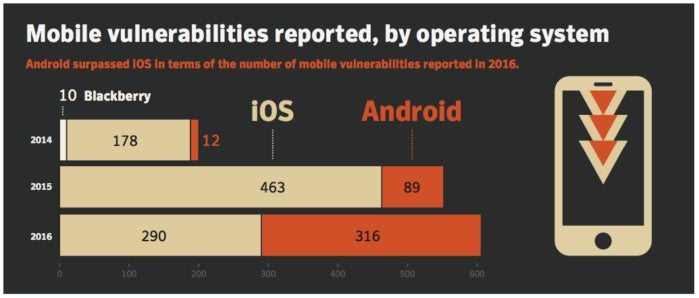
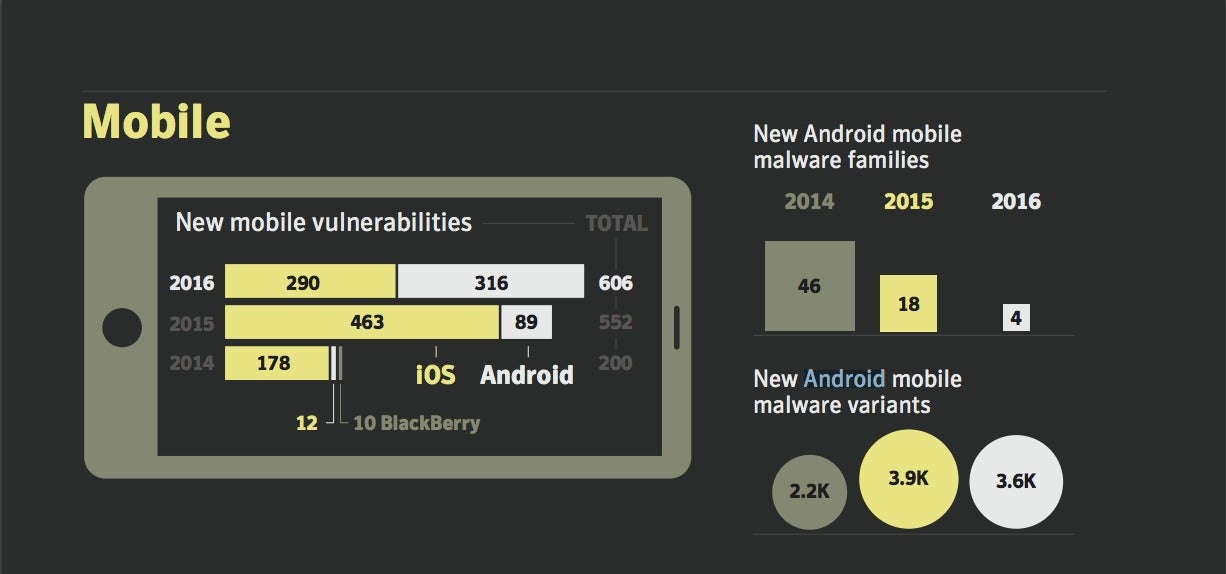
According to Symantec, from 2014 through 2016 the level of iOS vulnerabilities remained fairly flat. And while new Android malware families dropped significantly, from 46 in 2014, to 18 in 2015 and just 4 in 2016, the OS remains the main focus for mobile attacks, Symantec noted.
The overall volume of malicious Android apps increased significantly in 2016, growing by 105%, but that was still smaller than in 2015, when the number of malicious apps increased by 152%.
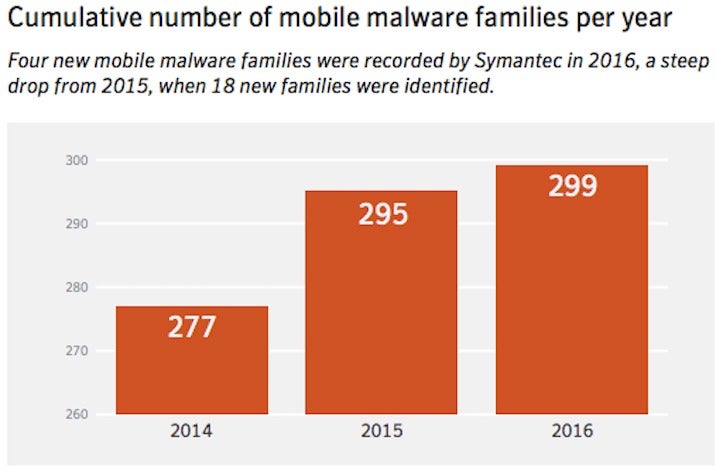
Mobile malicious threats are grouped into "families," and "variants." Malware families are a collection of threats from the same or similar attack groups. In 2014, there were 277 malware families overall. That grew to 295 families in 2015 and 299 in 2016. So while the number of new families grew more slowly, the overall number of threats remained sizable.


Android vs iOS 
The overall number of vulnerabilities doesn't tell the entire story, according to Gold."The number of malware variants that attempted to exploit these vulnerabilities is far more numerous," Gold said in a report he issued last year titled, "Android in the Business Environment: Is It Safe?"
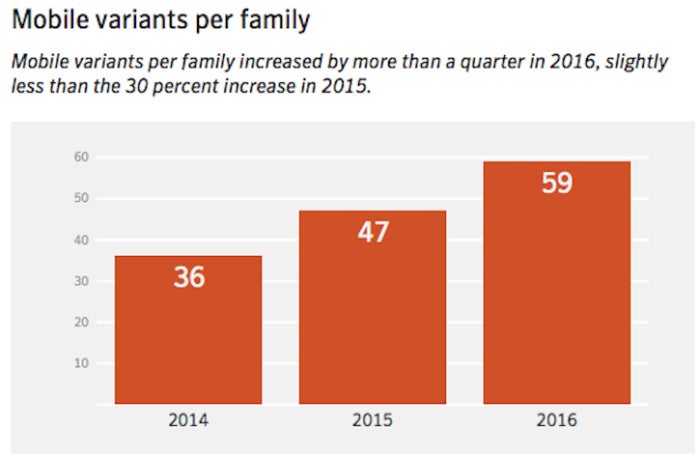
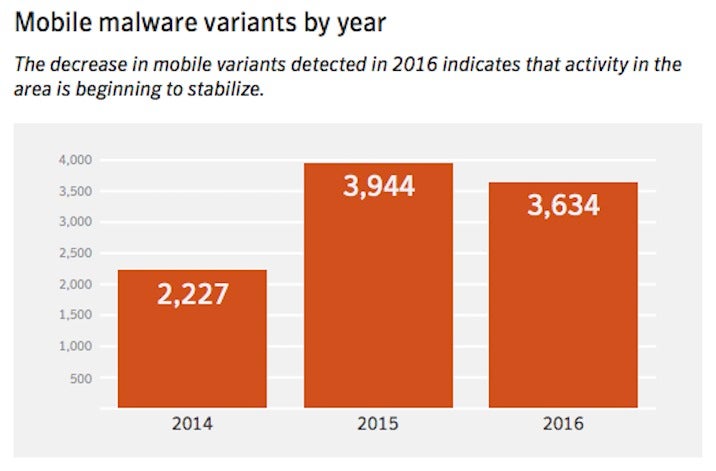
Variants are modifications hackers make to malware, and they can number in the thousands, overall. For example, last year there were 59 variants of 18 new malware families, which translates into more than 1,000 new mobile malware variants, according to Symantec. Mobile malware variants per family increased by more than a quarter in 2016, slightly less than the 30% increase in 2015.


Android vs. iOS 
"It is a very significant problem. For bring-your-own-device organizations, they don't have a choice. It's not their device so they don't know if it has the latest OS," Gold said. "Some organizations do require if you have a device without the latest OS, you can't log into the corporate network, but that's rare."Because there were fewer new malware families in 2016, but a greater number of variants, Symantec deduced that attackers "are opting to refine and modify existing malware families and types rather than develop new and unique threat types."


iOS attacks occur, too

Those attacks included iOS.
While rare, three zero-day vulnerabilities in iOS were exploited in targeted attacks to infect phones with Pegasus malware in 2016. Pegasus is a spy software that can take over an iPhone and access messages, calls, and emails.
The Pegasus malware can also gather information from apps, including Gmail, Facebook, Skype, and WhatsApp, according to Symantec.
The attack worked by sending a link to the victim through a text message. If the victim clicked on the link then the phone was jailbroken, Pegasus could be injected onto it and start spying.
The vulnerabilities that allowed the Pegasus attack to take place included one in the Safari WebKit that allowed an attacker to compromise the device if a user clicked on a link, an information leak in the OS kernel, and an issue where kernel memory corruption could lead to a jailbreak, Symantec said.
Just one mobile device infected with malware can cost an organization on average $9,485, according to a report issued last year by the Ponemon Institute. The potential financial consequences if a hacker compromises an employee’s mobile device to steal their credentials and access sensitive and confidential company data can be larger; it costs an average of $21,042 to investigate, contain and remediate damage from such an attack.


Android vs iOS  
Ponemon Institute/J. Gold Associates
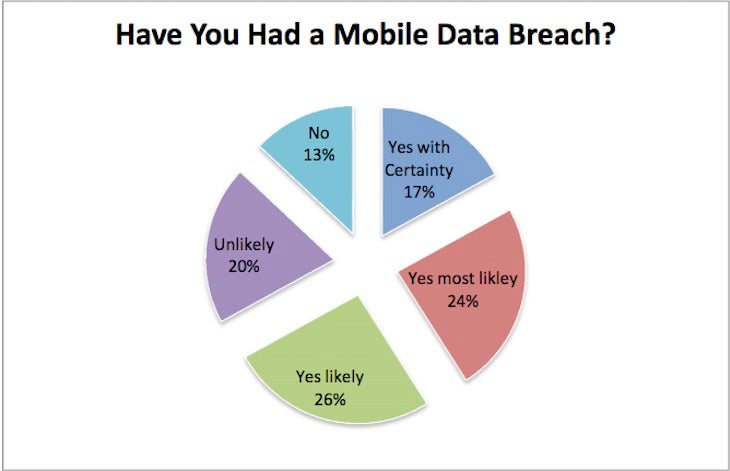
A survey of 588 IT managers and IT security professionals by the Ponemon Institute relased in February 2016 revealed 67% of companies are either certain, very likely or likely to have had a security breach due to a mobile device.
Most attacks on mobile devices are related to hackers trying to steal confidential information,such as contact lists, trying to send text messages, or launching a denial of service attack. To date, ransomware attacks, where blackhat operators lock a device and require a "ransom" be paid to unlock it, have been far rarer, according to Gold. However, "I'd bet ransomware is coming to mobile devices in the near future. I can't imagine why it wouldn't."Think about what the average user has on their phone. If someone shut down your phone tomorrow, it would be a big problem," Gold said.

Android is making progress

Among new malware attack vectors, Android continues to be the most targeted mobile platform, according to Symantec.
A noteworthy change in 2016: Android surpassed iOS in terms of the number of mobile vulnerabilities reported, a stark contrast with previous years, "when iOS far outstripped Android in this area," Symantec said.
"This change may be partially attributed to continuing improvements in the security of the Android architecture and an ongoing interest by researchers in mobile platforms," the report noted.
"Following an explosive year in 2015," Symantec said, security improvements in Android's architecture "have made it increasingly difficult to infect mobile phones or to capitalize on successful infections."
William Stofega, IDC's program director for mobile phone research, agreed Google has made a concerted effort in recent years to take back control of its Android OS compared to its "wild west" early days, when anyone could change the source code.


iOS vs Android Symantec
For example, Google now manages its source code to ensure app developers and smartphone manufacturers must go through Android compatibility testing.In addition, the upcoming release of Google's newest mobile OS, Android O, may not be as open as its predecessors.
"It's been implied that they're going to rebuild it and it won't be under public license, and they'll avoid disclosing source code," Stofega said. "It hasn't been implemented yet, but it would make it more difficult to break in.
"I still think there's been a lot of progress made -- not that it doesn't need additional progress," Stofega added.
Android smartphone and tablet manufacturers such as Samsung have also upped their security. For example, Samsung's Knox, a free containerization security app, enables greater separation between enterprise and personal data by creating a virtual Android environment within mobile devices -- complete with its own home screen -- as well as its own launcher, apps and widgets.
Knox creates a container so that only authorized personnel can access content within it. All files and data, such as email, contacts, and browsers are encrypted within the container.
Knox also allows end-users to securely add personal apps to the My Knox Container via Google Play. Once inside the container, the personal apps utilize the same security of Knox.
"A lot of this is about how you introduce something like Android into the enterprise," Stofega said.

A mobile malware strategy

As more companies adopt a "mobile first" business strategy, the most common solution to avoiding malware is relatively simple: keep the software on the devices regularly updated. Updating software to the latest platform helps address OS variants. Of course, while technically simple, all things are relative.
For organizations that have a BYOD policy, getting users to update their mobile OS is, at best, a struggle, Gold said as "it's not their device."
Even for enterprises that issue mobile devices, updating software can be arduous and spur pushback from users. But it's critical to regularly issue patches and platform updates.
"I've talked to IT managers, and users often don't want to update their software. A lot of folks just don't keep to the schedule. But it's terribly important," Stofega said.
Companies should also avoid a "mobile" security strategy, Gold said.
"They should have a security strategy and mobile should be a part of it," he explained. "If you're trying to do something unique for mobile devices, it may not necessarily fit in with everything else you're doing in the company. Whereas, if you have an overarching security policy, then you can do all you want in mobile to fit in with that overarching strategy."
For example, companies are beginning to roll out encryption on mobile devices to protect corporate data, yet many they don't have it on their desktops. Conversely, if a company has two-factor authentication on PCs in order to access a corporate application, such as SAP, they should also have it on mobile devices, Gold said.
"Optimize security first, and then figure out what you can do on each device. In some cases you can't have equivalence. Just do the best you can," he said.
Gold, Stofega and Symantec recommend companies keep the software on corporate-issued mobile devices up to date, and issue frequent notices to employees using their own hardware to do the same. And it's important to remind workers to refrain from downloading apps from unfamiliar sites and install apps only from trusted sources.
Symantec also recommends that IT admins pay close attention to the permissions requested by mobile apps, as it can indicate malicious behavior.
Additionally, companies that do issue mobile devices to employees should ensure that  Android devices are enhanced for corporate use. Google is addressing the needs of many business Android users by offering an enterprise-class upgrade known as Android at Work. The Android at Work mobile devices offer segmented workspaces and profiles to keep corporate and personal apps separate.
They also require companies to first deploy a set of enforcement tools on a mobile device, either through mobile device management or a wider-encompassing enterprise mobility management tool set, according to Gold.
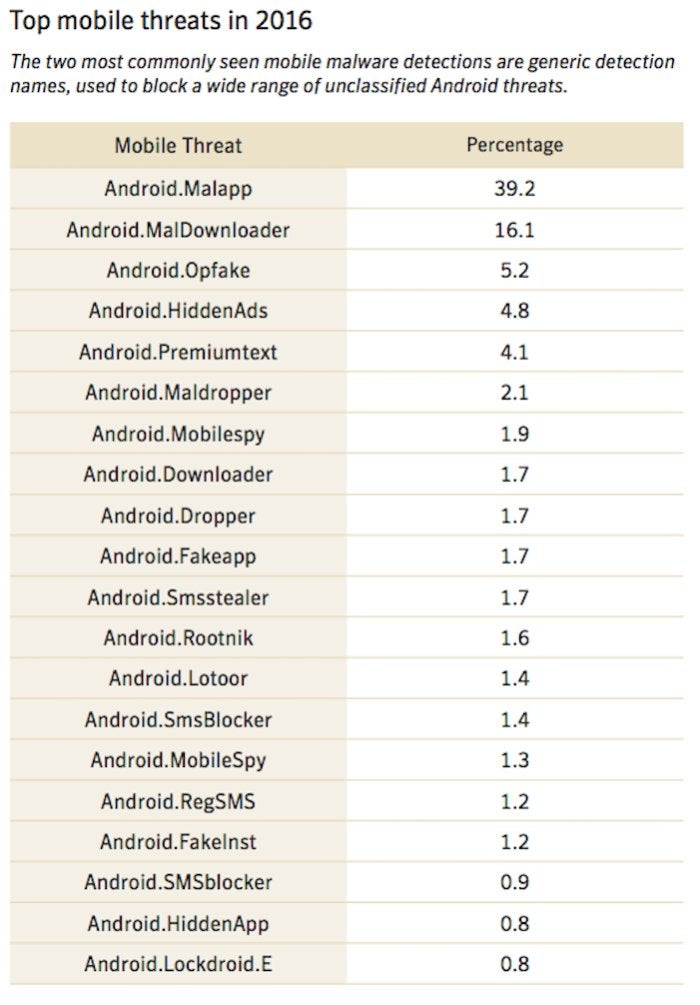
Some new mobile malware has been identified as having rootkit capabilities, or modified OSes that can be used to gain administrative access to corporate systems. So enterprises should also install root detection software on mobile devices, or better yet, purchase mobile hardware already configured with root detection software.
"Essentially, this allows a way for any low-level code running the device to be pre-vetted so as to determine if it is genuine," Gold's report said. "It prevents the ability to root, or to substitute a corrupted OS that could then be used to boot the system."
Device manufacturers can also play a key role in making phones and tablets more secure. Some mobile vendors have been known to delay OS updates for months; that practice, according to Gold's report, should indicate to an enterprise that the vendor is an unacceptable hardware supplier.
Lastly, while adding security feature to mobile devices is recommended, it's not as useful as simply stick to good practices. Educating employees about best practices, such as not downloading apps they've not vetted or opening unexpected attachments in messages, is crucial.
"A lot of this is about getting users on your side," Gold said. "Dialogue with them and educate them on why security is necessary. There are a lot of practices users do that they shouldn't, but they simply don't know any better."

Sunday, July 17, 2016

Pokémon GO map
Pokémon GO was released just a few days ago and is already taking the world by storm. The new game, created by Nintendo in partnership with Niantic, has made headlines all over the world. The experts are even talking about a new mania that is driving both the young and middle-aged crazy! In less than a week since its release in the United States, Pokémon GO is proving more addictive than Tinder and Snapchat, according to the official numbers, while an abundance of stories and crazy facts about the popular app are going viral. We’ve collected 25 Pokemon GO Facts that are making it the hottest thing at the moment. The real question is: Why bother searching for a date when you can say, “I choose you” to Pikachu? He’s probably cuter anyways! These are 25 Pokemon GO Facts You’ve Gotta know Before You Go.


Breaking All the Records

The First week of its release, Pokemon GO is already reported bigger than Tinder in the US. Nintendo’s valuation went up by $9 billion with all the press and mania over the release of Pokemon GO worldwide. Pokemon GO was installed more than twice the number of the android phone in the First week. As per the report from SimilarWeb, 62 percent of Android users in the US are playing the game everyday which also break the daily users record of social giant Twitter.

Making You Healthy

The Game uses the Geotagging so the player can catch Pokemons in Real World, this makes the Players get out of the office/home and walk around in the real world. Your character in the game walks and turns the same way you move. In the First week, we saw a lot of players complaining about the Sore Legs and posting funny stories about the game online. You might be lucky if you have a PokeStop and a Gym nearby but for hatching Pokemon eggs, the game requires you to walk a set distance to accomplish this goal.

A Profitable Side Business

After the Hugh Success, the trending Pokemon GO has led many business owners to either post warning signs on their properties or make a business out of the Lucky PokeStop. For example, there is a PokeStop at the Restaurant you might take an advantage of it and attract more Pokemon trainers at your location. There are also few cases where people have complained about trespassing their private property.

May Help Some Criminals to Commit Crimes

Being the Fun part that you have to explore the real world also makes it scary as there are savvy criminals who have already tried to take advantage of the new trend. You have to be careful where you are heading. Police officers in O’Fallon, Missouri, arrested four people suspected of using Pokemon GO to lead their victims to remote areas to 'catch' Pokemon characters and rob them. Be Careful and Stay Alert.

Fake Counterfeit Version

Pokemon Go has to be Launched for Australia, The United States, and New Zealand. If you happen to live outside these three then you'll be trying to download from some sources. We want to warn you about the Counterfeit Version of Pokemon GO are there online which contains malicious content that can damage your phone. Try to wait until July 15, when the game is expected to be released in Europe and Asia.

Reason behind Pokemon GO

According to its developers, Pokemon GO is destined to help people with anxiety, panic attacks, and depression. As the Game requires and forces people to physically get up and head outside to explore the new area, it encourages people with agoraphobia to leave their house, exercise and engage with other people.

Fun But Risky

While playing Pokemon GO, you need to track the nearby PokeStops, Gym, and sometimes places where Pokemon spawn, but getting people out of the house to play a video game can also be terrifying at times. The is a warning for those players who go into strange alleys finding for Pokemon. Reportedly, A girl searching for a Pokemon ended up finding a dead body. Be Alert.

Good for Young Americans

Americans have always think about distance in miles and in Pokemon GO you need to think in kilometers instead of miles. Gizmodo predicts that millions of young Americans will eventually learn the metric system all because of Pokemon GO, as it will force them to think in kilometers instead of miles.

Monday, March 30, 2015

The most awaited feature of Whatsapp has finally came and that is Whatsapp voice calling. There were users who were eager to avail this feature of Whatsapp and it has finally came. The latest voice calling feature has taken Whatsapp to another peak of success.
The Whatsapp voice calling is not different from Viber, Skype, Line or other services, but it has many more users than these. Therefore, there is a scope of using this feature by many users and many can interact with their circle using Whatsapp voice calling. Additionally, there must be many users who are not very much acquaint with the process of enabling this on their Smartphones. Therefore, today we are going to make you learn that, “How to Enable Whatsapp Voice Calling on Smartphone?” You need to apply these simple steps and then you’ll be able to start making voice calls to your Whatsapp friends; however, remember that your friend must have enabled the voice calling too. You can only make calls using Whatsapp ones you have enabled the voice calling both sides.


Learn-How to Enable Whatsapp Voice Calling

So, here are the steps which are supposed to followed in order to enable Whatsapp voice calling on your Smartphones. The steps are quiet simple yet hidden and today these are going to be revealed for you guys here. Now, without taking your time more, I would request you to get towards the below piece of content in order to get this feature for your accounts too.

1. First of all, get the latest version of Whatsapp on your Phone. The latest version is Version 2.12.16.

2. Once it is downloaded then install it on your Phone and then it’ll automatically add the voice calling feature to your account.

3. Now, you need to go to your Contacts and find a friend who has enabled this feature already, then you’ll see a Call button there. Simply tap on it and start making voice calls.

Conclusion

This was our simple guide which could be used to enable Whatsapp voice calling on your Smartphones. We are sure that this would have been proven helpful for many of you out there. If you have any queries or questions to ask then do let me know. We shall get back to your queries and questions as soon as possible.

Furthermore, if you have found this guide helpful and worth reading then do share it with your other friends and circle too. You may never know that your shares may be proven helpful for many of the users out there. So, keep sharing and liking our content over social media in order to keep helping people in your circle.

Friday, March 27, 2015

Hope you enjoying well, Today we going to give you a new trick of AirTel 3G TCP vpn configs of April 2015 for free net/Gprs in your mobile and computer.This TCP trick working fine in many states and also giving 3G speeds so no need to very so read full post to know how you use it Free. 

There is so many days left we does not post any airtel trick so we decided to post new again.Because you know airtel is our favorite network for free net.
                    

So let's start...

Requirement For this AirTel 3G Tcp Vpn Trick 
  1. AirTel 3G/2G Enabled Sim card.
  2. Nmdvpn Client (download from here).
  3. PC or MOBILE.
If you have all basic requirements which above listed,then you are ready to go for next steps.And i hope you have every thing.
Now most important thing ,Now download config file from below link First.


Now i Hope you downloaded above file form datafile host link.Now  you are ready to move next step.Now choose you pc user or mobile user ,means on which medium you are going to use it and choose those medium and follow the steps.

For PC Users:

1.Connect your system with modem/Mobile with APN airtelgprs.com
2.Download The Attachment ofAirtel Tcp 3G Vpn Trick (if downloaded all ready then go to next step).
2.Install Nmdvpn and Put configs(or exact) Here (C:\Program Files\NMDVPN\config) in your system location
3.Windows 7 and Windows 8 Users RUN NMD VPN as the Administrator.
4.Just Connect given server and Enjoy.

And if you have not a PC/Computer  Then you can also enjoy free net in your android mobiles.

For Mobile users:  

Android mobile use can also use these airtel tcp 3G Trick configs  with their android devices just you need to follow these simple steps :
  1. Download and extract config in SD card.
  2. Go to Google Play Store Search for open vpn for android. Or Click Here
  3. Install Open Vpn in you android device.
  4. Add airtel tcp 3G Vpn Config to open Vpn folder.
  5. when it ask user name password (see earticleblog txt file in attachment) enter it.
  6. Run and Enjoy  :) 
Hope you follow all process and enjoyed this trick.
Note- Do't try at higher balnce your balnce got deducted.Use it at 0 rs balnce.

Friday, March 6, 2015

facebook-suicidal-post-reporting-tool-

A few ago, in order make its product more helpful, Facebook updated its tool to report suicidal post. Facebook claims that this tool will make it easy to report a person if he is having any kind of suicidal tendency. You can report a friend’s suicidal post and that friend will be provided help using different measures.

Today, I am going to tell you how to report suicidal posts on Facebook.

Step 1: Click on the arrow in top right corner of the post and then click on “I don’t like this post.”

facebook-suicidal-post-reporting


Step 2: Now click on “I think it shouldn’t be on Facebook” and continue.

facebook-suicidal-post-reporting-step2

Step 3: Select  “It’s hurtful, threatening or suicidal” and continue.

facebook-suicidal-post-reporting-step3

Step 4: Now select “I think they might hurt themselves.”

facebook-suicidal-post-reporting-steps

Step 5: Now Facebook will give you different options to reach to your friend who is having some suicidal tendency. This option may vary in number depending upon the services provided in your region. I am getting only 3 here, but for some of you options like “Chat with the trained helper” or “Call lifeline”

facebook-suicidal-post-reporting-steps

Friday, February 13, 2015

At the start of this month, Whatsapp added a new feature of Reading Receipts. One grey tick meant that the message has been sent, two grey ticks meant that the message has been delivered and two blue ticks meant that the message has been read by the recipient. The new Whatsapp feature of reading receipts was a welcome feature for many people, but it was a nightmare for some. I personally found the feature helpful and I was already loving similar feature on Hike and BBM.

Now Whatsapp is rolling out an update to give its users the choice to disable this feature. Read this post to know how to disable blue ticks right now.


Whastapp was on the receiving end on many online forums where people blamed this feature for jeopardising their relationships and some even claimed the instances of divorce due to divorce. Some people may fail to understand the concern, but this surely is an important factor if you are ignoring someone.

Now Whatsapp has addressed this issue and is working on a new update. This update features the option to disable the blue tick (reading receipts) on your phone. Right now this update is unavailable on mobile app store platforms but Whatsapp has released the updated version of app on their website. You need to manually download the application and install the Whatsapp apk file. The available version of Whatsapp on Google Play store is 2.11.432 but the update version available on the website is 2.11.452.

updated-whatsapp-blue-ticks

Updated version 2.11.452 installed on my device

How to get the update right now? 

  • Go to the Whatsapp website and download the apk file.
  • Once downloaded, transfer the file to your phone.
  • Open the apk file from your file browser app and click on the file.
  • After completing the installation, go to settings menu un Whatsapp and then proceed to privacy option.
  • Here you will see the Read Receipts option already checked.
  • Now uncheck this option to disable the blue tick.
whatsapp-update-blue-tick

Read Receipts option in privacy settings

Right now this update is only available for Android users via apk download. It is not known when the full update will be pushed out to all users, or when other platforms including iOS and BlackBerry will see the changes.


Saturday, July 19, 2014

How Can We Protect Our Website By Common Web Attacks ?


On this post i am telling about five types of common web attacks, which are used in most types of defacements or dumps of databases.
Following five exploits are listed SQL injection, XSS, RCE, RFI, and LFI. Most of the time, we missed out some website code tags. So that our website gets attack and allows the hacker for hijack the vulnerable website.

1. SQL Injection
       
Types ->

     Login Form Bypassing
     UNION SQL Injection

2. Cross Site Scripting ( XSS )

Types -> Cross Site Request Forgery

3: File Inclusion

Types -> Remote File Inclusion and Remote Code Execution


1. SQL Injection

>> Login Form Bypassing
Here is an example of the vulnerable code that we can bypass very easily:

    index.html file:
    <form action="login.php" method="POST" />
    <p>Password: <input type="text" name="pass" /><br />
    <input type="submit" value="Authenticate" /></p>
    </form>
    login.php file:
    <?php
    // EXAMPLE CODE
    $execute = "SELECT * from database WHERE password = '{$_POST['pass'])";
    $result = mysql_query($execute);
    ?>

We can simply bypass this by using ' or '1=1', which will execute "password = ''or '1=1'';".

Alternatively, the user can also delete the database by executing "' drop table database; --".


>> PREVENTION:

Use mysql_real_escape_string in your php code.

Example:

    <?php
    $badword = "' OR 1 '";
    $badword = mysql_real_escape_string($badword);
    $message = "SELECT * from database WHERE password = "'$badword'";
    echo "Blocked " . $message . ";
    ?>

>> UNION SQL Injection

UNION SQL injection is when the user uses the UNION command. The user checks for the vulnerability by adding a tick to the end of a ".php?id=" file.
If it comes back with a MySQL error, the site is most likely vulnerable to UNION SQL injection. They proceed to use ORDER BY to find the columns, and at the end, they use the UNION ALL SELECT command. An example is shown below.

http://www.site.com/website.php?id=1'

You have an error in your SQL syntax near '' at line 1 SELECT SUM(quantity)
as type FROM orders where (status='completed' OR status='confirmed' OR status='pending') AND user_id=1'


No error--> http://www.site.com/website.php?id=1 ORDER BY 1-- 

Two columns, and it comes back with an error! This means that there is one column.
 http://www.site.com/website.php?id=1 ORDER BY 2--


Selects the all the columns and executes the version() command on the only column.
http://www.site.com/website.php?id=-1 UNION SELECT ALL version()--


SOLUTION:

Add something like below to prevent UNION SQL injection.

    $evil = "(delete)|(update)|(union)|(insert)|(drop)|(http)|(--)|(/*)|(select)";
    $patch = eregi_replace($evil, "", $patch);


2. Cross Site Scripting

Cross site scripting is a type of vulnerability used by hackers to inject code into vulnerable web pages. If the site is vulnerable to cross site scripting, most likely users will try to inject the site with malicious javascript or try to scam users by creating a form where users have to type their information in.

There are two types of XSS (cross site scripting) are persistent XSS and non-persistent XSS.


Example:
http://www.site.com/search.php?q=">


SOLUTION

        function RemoveBad(strTemp) {
            strTemp = strTemp.replace(/\<|\>|\"|\'|\%|\;|\(|\)|\&|\+|\-/g,"");
            return strTemp;
        }


3. File Inclusion
Types: Remote File Inclusion/Local File Inclusion, and Remote Code Execution

Remote File Inclusion allows a hacker to include a remote file through a script (usually PHP). This code is mostly patched on websites, but some websites are still vulnerable to the vulnerability. RFI usually leads to remote code execution or javascript execution.

Example of the vulnerable code:

    <?php
    include($_GET['page']);
    ?>

Exploiting would be something like as follows:
http://www.site.com/page.php?page=../../../../../etc/passwd or
http://www.site.com/page.php?page=http://www.site.com/xyz.txt?

SOLUTION:

    Validate the input.
    $page = $_GET['page'];
    $allowed = array('index.php', 'games.php' 'ip.php');
    $iplogger = ('ip.php');
    if (in_array $page, $pages)) {
    include $page {
    else
    {
    include $iplogger
    die("IP logged.");
    }


For remote code execution, the site would have to have a php executing command. You would patch this by about doing the same thing.

 Note: I hope this post will helpful for your website to get secure from above types of attacks.

Thursday, July 17, 2014

Type of attack on Web Based Application


[~]Sql Injection Attack
[~]Hibernate Query Language Injection
[~]Direct OS Code Injection
[~]XML Entity Injection
[~]Broken Authentication and Session Management
[~]Cross-Site Scripting (XSS)
[~]Insecure Direct Object References
[~]Security Misconfiguration
[~]Sensitive Data Exposure
[~]Missing Function Level Access Control
[~]Cross-Site Request Forgery (CSRF)
[~]Using Components with Known Vulnerabilities
[~]Unvalidated Redirects and Forwards
[~]Cross Site Scripting Attacks
[~]Clickjacking Attacks
[~]DNS Cache Poisoning
[~]Symlinking – An Insider Attack
[~]Cross Site Request Forgery Attacks
[~]Remote Code Execution Attacks
[~]Remote File inclusion
[~]Local file inclusion
[~]Evercookie
[~]Denial of Service Attack
[~]Cookie Eviction
[~]phpwn
[~]NAT Pinning
[~]XSHM
[~]MitM DNS Rebinding SSL/TLS Wildcards and XSS
[~]Quick Proxy Detection
[~]Improving HTTPS Side Channel Attacks
[~]Side Channel Attacks in SSL
[~]Turning XSS into Clickjacking
[~]Bypassing CSRF protections with ClickJacking and
[~]HTTP Parameter Pollution
[~]URL Hijacking
[~]Strokejacking
[~]Fooling B64_Encode(Payload) on WAFs and filters
[~]MySQL Stacked Queries with SQL Injection.
[~]Posting raw XML cross-domain
[~]Generic cross-browser cross-domain theft
[~]Attacking HTTPS with Cache Injection
[~]Tapjacking
[~]XSS-Track
[~]Next Generation Clickjacking
[~]XSSing client-side dynamic HTML.
[~]Stroke triggered XSS and StrokeJacking
[~]Lost in Translation
[~]Persistent Cross Interface Attacks
[~]Chronofeit Phishing
[~]SQLi filter evasion cheat sheet (MySQL)
[~]Tabnabbing
[~]UI Redressing
[~]Cookie Poisoning
[~]SSRF
[~]Bruteforce of PHPSESSID
[~]Blended Threats and JavaScript
[~]Cross-Site Port Attacks
[~]CAPTCHA Re-Riding Attack

Wednesday, July 16, 2014

32 Commands For Linux Users From All Levels!

Beginner Commands

1. find: Use this command when you need to search for files in a particular directory. It starts from the parent directory and then moves to the sub directories. The –name option makes the search case sensitive, while the –iname option searches irrespective of the case.

2. grep: You use the grep command in order to find lines in a particular file that match a given string or words.

3. man: The man command is used as the manual pager for the system. It brings online documentation for a particular command.

4. ps: This is the process command, which shows you the status of all the processes that are being run by a unique id, known as the PID.

5. kill: This command is used in order to kill a process that is not responding or is not being used. All you need is to known the process ID or PID. To find the process id, you need to run ps-A with the grep command (ps-A | grep processname).

6. whereis: When you need to locate the binary, sources and the manual page of a command you use the whereis command.

7. service: This is the command that is used in order to control the start, stop or restart function of a particular service. You do not have to restart your system in order to start, stop or restart the services.

8. alias: This is a built in shell command which is used in order to assign the name for a long command or for a frequently used command.

9. df: Use this command when you want to report the disk usage of a file system. It is quite useful for the user and also for the system admin.

10. rm: This command is used in order to remove complete files and directories from your system.

Intermediate Commands

1. find: Use this command when you need to search for files in a particular directory. It starts from the parent directory and then moves to the sub directories. The –name option makes the search case sensitive, while the –iname option searches irrespective of the case.

2. grep: You use the grep command in order to find lines in a particular file that match a given string or words.

3. man: The man command is used as the manual pager for the system. It brings online documentation for a particular command.

4. ps: This is the process command, which shows you the status of all the processes that are being run by a unique id, known as the PID.

5. kill: This command is used in order to kill a process that is not responding or is not being used. All you need is to known the process ID or PID. To find the process id, you need to run ps-A with the grep command (ps-A | grep processname).

6. whereis: When you need to locate the binary, sources and the manual page of a command you use the whereis command.

7. service: This is the command that is used in order to control the start, stop or restart function of a particular service. You do not have to restart your system in order to start, stop or restart the services.

8. alias: This is a built in shell command which is used in order to assign the name for a long command or for a frequently used command.

9. df: Use this command when you want to report the disk usage of a file system. It is quite useful for the user and also for the system admin.

10. rm: This command is used in order to remove complete files and directories from your system.

Advanced Commands

1. ifconfig: You will use the ifconfig command when you need to improve the kernel-resident network interfaces. The command is usually needed for system tuning and debugging, but it is also used during boot time in order to set up the interfaces.

2. netstat: This is an advanced command for Linux users that is used to display information related to the network. This includes information such as routing tables, network connections, masquerade connections, interface statistics and others.

3. nslookup: This command will be used when you need to find information about Internet servers. It finds you the name server information for the domains that are querying the DNS.

4. dig: The dig tool is used in order to query the DNS nameservers. If you need to find information on host addresses, mail exchanges, nameservers and other related information, then this is the tool for you. You can use the command from Linux and Mac OS X operating systems.

5. uptime: The uptime command is used in order to verify what all happened when a server has been left unattended. It is especially useful when you sit down in front of the server machine and see something gone awry.

6. wall: This command is used to send a message to all logged in users. You can only send the message to those with their message permission setting at ‘yes’ though. The message is given as an argument for the wall command.

7. mesg: Users can use the ‘write’ command in order to send messages to you. But as the server admin, you can use the mesg command in order to decide whether they can. You can choose from ‘n’ and ‘y’, which allow messages to not popup and popup on your screen respectively.

8. write: If the status for the ‘mesg’ command for a user is set to ‘y’ then the write command will allow you to send messages to that user.

9. talk: When a simple message is not enough, use the talk command to talk to users logged into the server.

10. w: This command is a combination of uptime and who commands, if they are given in that order and one after the other.

11. rename: When you need to rename certain specific files, the rename command comes in handy. This command renames files by replacing the first occurrence from that file.

12. top: Use this command in order to display the processes running in the CPU. The command will refresh automatically and keep displaying the processes until you use the interrupt command to stop it.


An SQL injection attack is a code injection attack that is used to exploit web applications and websites. It is one of the most common methods for hackers to get into your system. Learning such attacks are important for anyone looking to perform their own exploits. Here are 10 of the most powerful tools that aid in performing SQL Injection attacks.

1. BSQL Hacker
This is a useful tool for both experts and beginners that automates SQL Injection attacks on websites.

2. The Mole
This is an SQL Injection tool that uses the union technique or the boolean query-based technique.

3. Pangolin
This is a penetration testing tool developed by NOSEC. It is aimed at detecting and exploiting SQL injection vulnerabilities on websites.

4. Sqlmap
This is an open source penetration testing tool that security professionals can use. Like the BSQL Hacker tool, this one also automates SQL Injection attacks.

5. Havij
This is an automated SQL injection tool that can be used by penetration testers in order to detect vulnerabilities in web applications and exploit them.

6. Enema SQLi
This is a dynamic penetration testing tool for professionals. It is an auto-hacking software.

7. Sqlninja
This is a tool targeted at exploiting SQL injection vulnerabilities. It uses the Microsoft SQL server as its back end.

8. sqlsus
Written using the Perl programming language, this is an open source penetration testing tool for MySQL Injection and takeover.

9. Safe3 SQL Injector
This is a powerful penetration testing tool, which automates the process of detecting and exploiting SQL Injection vulnerabilities.

10. SQL Poizon
This tool includes php , asp , rfi , lf dorks that can be used for penetration testing.

Saturday, July 12, 2014

Hacker's Dictionary


Are you new to the realm of hacking?

Do you feel dumb when you don't know the meaning of a certain term?Well, then this will certainly help you out!If you are ever unsure about anything, simply scroll down and find that specific word, then read the definition.
Anything includes: Abbreviations, Phrases, Words, and Techniques.*The list is in alphabetical order for convenience!*


----------------------------------------------------------------------------------------------------------------------------------


Abbreviations


★ DDoS = Distributed Denial of Service

★ DrDoS = Distributed Reflected Denial of Service Attack, uses a list of reflection servers or other methods such as DNS to spoof an attack to look like it's coming from multiple ips. Amplification of power in the attack COULD occur.

★ FTP =File Transfer Protocol. Used for transferring files over an FTP server.

★ FUD = Fully Undetectable

★ Hex =In computer science, hexadecimal refers to base-16 numbers. These are numbers that use digits in the range: 0123456789ABCDEF. In the C programming language (as well as Java, JavaScript, C++, and other places), hexadecimal numbers are prefixed by a 0x. In this manner, one can tell that the number 0x80 is equivalent to 128 decimal, not 80 decimal.

★ HTTP =Hyper Text Transfer Protocol. The foundation of data communication for the World Wide Web.

★ IRC = Internet Relay Chat. Transmiting text messages in real time between online users.

★ JDB =Java drive-by, a very commonly used web-based exploit which allows an attacker to download and execute malicious code locally on a slave's machine through a widely known java vulnerability.

★ Malware =Malicious Software

★ Nix = Unix based operating system, usually refered to here when refering to DoS'ing.

★ POP3 =This is the most popular protocol for picking up e-mail from a server.

★ R.A.T = Remote Administration Tool

★ SDB = Silent drive-by, using a zero day web-based exploit to hiddenly and un-detectably download and execute malicious code on a slave's system. (similar to a JDB however no notification or warning is given to the user)

★ SE = Social Engineering

★ Skid =Script Kid/Script Kiddie

★ SMTP =A TCP/IP protocol used in sending and receiving e-mail.

★ SQL =Structured Query Language. It's a programming language, that used to communicate with databases and DBMS. Can go along with a word after it, such as "SQL Injection."

★ SSH =Secure Shell, used to connect to Virtual Private Servers.

★ TCP = Transmission Control Protocol, creates connections and exchanges packets of data.

★ UDP =User Datagram Protocol, An alternative data transport to TCP used for DNS, Voice over IP, and file sharing.

★ VPN =Virtual Private Network

★ VPS =Virtual Private Server

★ XSS (CSS) = Cross Site Scripting


Words


★Algorithm = A series of steps specifying which actions to take in which order.

★ANSI Bomb = ANSI.SYS key-remapping commands consist of cryptic-looking text that specifies, using ansi numeric codes to redefine keys.

★Back Door = Something a hacker leaves behind on a system in order to be able to get back in at a later time.

★Binary = A numbering system in which there are only two possible values for each digit: 0 and 1.

★Black Hat = A hacker who performs illegal actions to do with hacking online. (Bad guy, per se)

★Blue Hat =A blue hat hacker is someone outside computer security consulting firms who is used to bug test a system prior to its launch, looking for exploits so they can be closed. Microsoft also uses the term BlueHat to represent a series of security briefing events.

★Bot = A piece of malware that connects computer to an attacker commonly using the HTTP or IRC protocal to await malicous instructions.

★Botnet = Computers infected by worms or Trojans and taken over by hackers and brought into networks to send spam, more viruses, or launch denial of service attacks.

★Buffer Overflow = A classic exploit that sends more data than a programmer expects to receive. Buffer overflows are one of the most common programming errors, and the ones most likely to slip through quality assurance testing.

★Cracker = A specific type of hacker who decrypts passwords or breaks software copy protection schemes.

★DDoS = Distributed denial of service. Flooding someones connection with packets. Servers or web-hosted shells can send packets to a connection on a website usually from a booter.

★Deface =A website deface is an attack on a site that changes the appearance of the site or a certain webpage on the site.

★Dictionary Attack = A dictionary attack is an attack in which a cyber criminal can attempt to gain your account password. The attack uses a dictionary file, a simple list of possible passwords, and a program which fills them in. The program just fills in every single possible password on the list, untill it has found the correct one. Dictionary files usually contain the most common used passwords.

★DOX = Personal information about someone on the Internet usualy contains real name, address, phone number, SSN, credit card number, etc.

★E-Whore = A person who manipulates other people to believe that he/she is a beautiful girl doing cam shows or selling sexual pictures to make money.

★Encryption = In cryptography, encryption applies mathematical operations to data in order to render it incomprehensible. The only way to read the data is apply the reverse mathematical operations. In technical speak, encryption is applies mathematical algorithms with a key that converts plaintext to ciphertext. Only someone in possession of the key can decrypt the message.

★Exploit = A way of breaking into a system. An exploit takes advantage of a weakness in a system in order to hack it.

★FUD = Fully undetectable, can be used in many terms. Generally in combination with crypters, or when trying to infect someone.

★Grey Hat = A grey hat hacker is a combination of a Black Hat and a White Hat Hacker. A Grey Hat Hacker may surf the internet and hack into a computer system for the sole purpose of notifying the administrator that their system has been hacked, for example. Then they may offer to repair their system for a small fee.Hacker (definition is widely disputed among people...) = A hacker is someone who is able to manipulate the inner workings of computers, information, and technology to work in his/her favor.

★Hacktivist = A hacktivist is a hacker who utilizes technology to announce a social, ideological, religious, or political message. In general, most hacktivism involves website defacement or denial-of-service attacks.

★IP Address = On the Internet, your IP address is the unique number that others use to send you traffic.

★IP Grabber = A link that grabs someone's IP when they visit it.

★Keylogger = A software program that records all keystrokes on a computer's keyboard, used as a surveillance tool or covertly as spyware.Leach = A cultural term in the warez community referring to people who download lots of stuff but never give back to the community.

★LOIC/HOIC = Tool(s) used by many anonymous members to conduct DDoS attacks. It is not recommended to use these under any circumstances.

★Malware =Software designed to do all kinds of evil stuff like stealing identity information, running DDoS attacks, or soliciting money from the slave.

Neophyte = A neophyte, "n00b", or "newbie" is someone who is new to hacking or phreaking and has almost no knowledge or experience of the workings of technology, and hacking.

★smith = Somebody new to a forum/game.

★OldFag = Somebody who's been around a forum/game for a long time.

★Packet = Data that is sent across the Internet is broken up into packets, sent individually across the network, and reassembled back into the original data at the other end.

★Phreak =Phone Freaks. Hackers who hack cell phones for free calling. Free Long distance calling. Etc.

★Phreaking = The art and science of cracking the phone network.

★Proxy = A proxy is something that acts as a server, but when given requests from clients, acts itself as a client to the real servers.

★Rainbow Table = A rainbow table is a table of possible passwords and their hashes. It is way faster to crack a password using rainbow tables then using a dictionary attack (Bruteforce).

★Remote Administration Tool =A tool which is used to remotely control (an)other machine(s). These can be used for monitoring user actions, but often misused by cyber criminals as malware, to get their hands on valuable information, such as log in credentials.

★Resolver =Software created to get an IP address through IM (instant messenger, like Skype/MSN) programs.

★Reverse Engineering = A technique whereby the hacker attempts to discover secrets about a program. Often used by crackers, and in direct modifications to a process/application.

★Root = Highest permission level on a computer, able to modify anything on the system without restriction.

★Rootkit (ring3 ring0) =A powerful exploit used by malware to conceal all traces that it exists. Ring3 - Can be removed easily without booting in safemode. Ring0 - Very hard to remove and very rare in the wild, these can require you to format, it's very hard to remove certain ring0 rootkits without safemode.

★Script Kiddie = A script kid, or skid is a term used to describe those who use scripts created by others to hack computer systems and websites. Used as an insult, meaning that they know nothing about hacking.

★Shell = The common meaning here is a hacked web server with a DoS script uploaded to conduct DDoS attacks via a booter. OR A shell is an script-executing unit - Something you'd stick somewhere in order to execute commands of your choice.

★Social Engineer = Social engineering is a form of hacking that targets people's minds rather than their computers. A typical example is sending out snail mail marketing materials with the words "You may already have won" emblazoned across the outside of the letter. As you can see, social engineering is not unique to hackers; it's main practitioners are the marketing departments of corporations.

★Spoof = The word spoof generally means the act of forging your identity. More specifically, it refers to forging the sender's IP address (IP spoofing). (Spoofing an extension for a RAT to change it from .exe to .jpg, etc.)

★SQL Injection =An SQL injection is a method often used to hack SQL databases via a website, and gain admin control (sometimes) of the site. You can attack programs with SQLi too.

★Trojan = A Trojan is a type of malware that masquerades as a legitimate file or helpful program with the ultimate purpose of granting a hacker unauthorized access to a computer.

★VPS = The term is used for emphasizing that the virtual machine, although running in software on the same physical computer as other customers' virtual machines, is in many respects functionallyequivalent to a separate physical computer, is dedicated to the individual customer's needs, has the privacy of a separate physical computer, and can be configured to run server software.

★Warez = Software piracy

★White Hat = A "white hat" refers to an ethical hacker, or a computer security expert, who specializes in penetration testing and in other testing methods to ensure the security of a businesses information systems. (Good guy, per se)

★Worm = Software designed to spread malware with little to no human interaction.

Zero Day Exploit = An attack that exploits a previously unknown vulnerability in a computer application, meaning that the attack occurs on "day zero" of awareness of the vulnerability. This means that the developers have had zero days to address and patch the vulnerability.

Hope we helped the new learners..............
Add me on Facebook Follow me on Twitter!